Report Results Panel
The Report Results panel on the Vehicle Acquisition Summary screen is used to view the Vehicle Acquisition Summary report. The Vehicle Acquisition Summary report can be used to review information about vehicles acquired as trade-ins or purchased from customers.

|
To access the Report Results panel, enter criteria in the Report Criteria panel on the Vehicle Acquisition Summary screen. Then click the RUN button. |
To export the information on this panel, click the  (Export Report) icon. The Export Report? window displays. Select a file format, such as .csv,.pdf, or .xlsx, and click the EXPORT button. The results are exported in the selected file format and are saved to the PC or network drive.
The following tabs display on this panel.
-
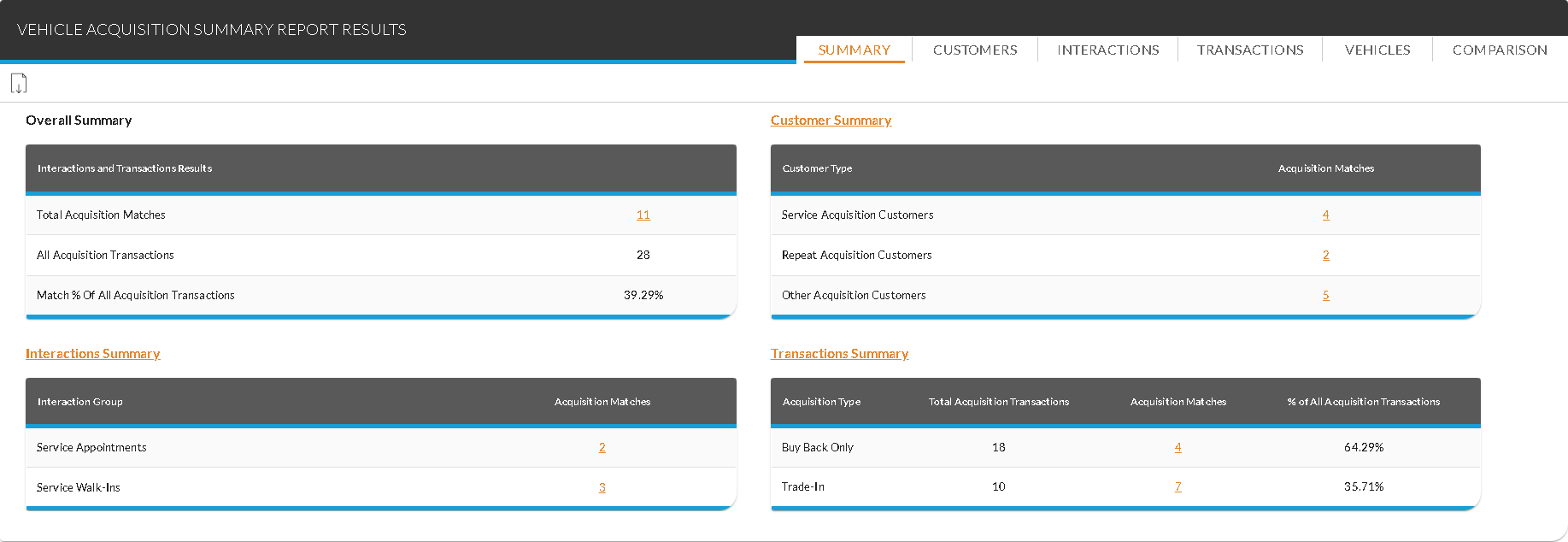
Summary tab. This tab is used to review information about vehicle acquisitions included on the Vehicle Acquisition Summary report, including the number of vehicles acquired from XtreamService leads, the number of service customers from whom vehicles were acquired, and the number of acquisitions by transaction type, such as trade-in.
-
Customers tab. This tab is used to review information about vehicle acquisitions based on the types of customers from whom vehicles were acquired as well as details about each acquisition.
Note - This tab is only available when Vehicle Acquisition Transaction Date is entered in the Type field.
-
Interactions tab. This tab is used to review information about vehicle acquisitions based on the type of interaction that generated each acquisition, such as service appointments or sales campaigns.
-
Transactions tab. This tab is used to review information about vehicle acquisitions based on whether vehicles were purchased from customers or acquired as trade-ins.
Note - This tab is only available when Vehicle Acquisition Transaction Date is entered in the Type field.
-
Vehicles tab. This tab is used to review the top vehicles acquired from XtreamService leads based on vehicle model.
Note - This tab is only available when Vehicle Acquisition Transaction Date is entered in the Type field.
-
Comparison tab. This tab is used to compare the results of the Vehicle Acquisition Summary report for two time frames.
Click here for a list of products that may be mentioned in this help file.